
Before You Log In to PariPesa
A failed login is often caused by a small mismatch rather than a lost account. Check the destination, identifier, password and device before attempting recovery.
Use password recovery or official support. A duplicate profile can complicate verification, payments and account ownership. If you have not registered yet, use the PariPesa registration guide.
Login, Registration and Recovery Are Different Actions
| Action | Who It Is For | Purpose |
|---|---|---|
| Registration | New users without an account | Create one account and establish its login details |
| Login | Registered users with working credentials | Access an existing account and its dashboard |
| Password or Account Recovery | Existing users who cannot access their account | Restore access without opening a duplicate profile |
How to Log In to PariPesa Step by Step
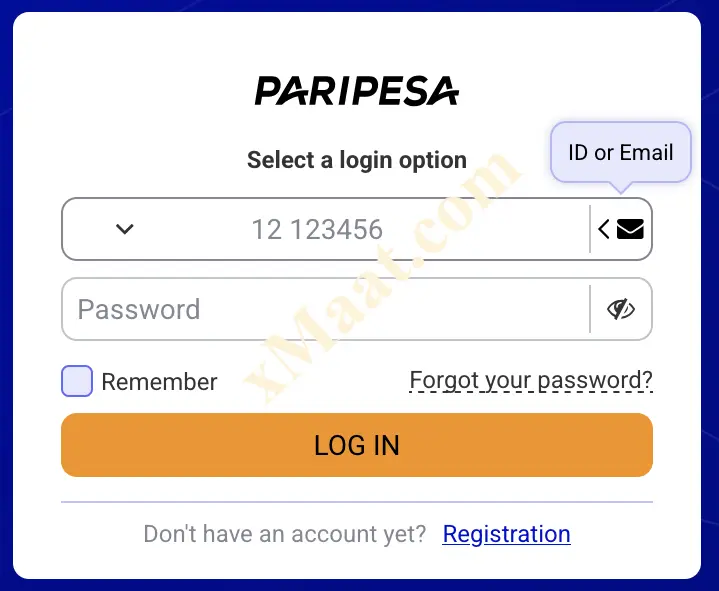
The reviewed login flow is consistent across supported desktop, mobile-browser and app interfaces, although button labels and available identifiers can differ.
Open the PariPesa Destination
Use a trusted route, verify the destination and select Log In. Do not follow account-access links from unsolicited messages.
Choose the Available Login Method
Select phone, email or another accepted account identifier when the form offers a choice. Use the method already connected to your account.
Enter Your Registered Identifier
Type the complete phone number with the correct country code, the exact registered email address or the account ID accepted by the current form.
Enter the Password Carefully
PariPesa passwords are case-sensitive. Check capital letters, keyboard language and accidental spaces before submitting.
Decide Whether to Remember the Session
Use a Remember me option only on a private device you control. Leave it disabled on shared, borrowed or public devices.
Submit the Login Form
Select Log In and complete any security check displayed. Repeatedly guessing an incorrect password can trigger a temporary restriction.
Review the Account After Access
Check the profile, recent activity and balance. If anything is unfamiliar, sign out, change the password and use official support.
PariPesa Login Methods
Use only an identifier already connected to the account. The current form determines which options are available on a particular interface.
| Method | When It Applies | What to Check |
|---|---|---|
| Phone Number | When phone login is shown for the account | Use the registered number and correct country code |
| Email Address | When email login is displayed | Enter the exact registered address without spaces |
| Account ID | When the interface accepts an account identifier | Use the ID recorded in your profile or account message |
| Mobile Browser | For access without installing software | Use a current supported browser and trusted connection |
| Supported App | For an installed PariPesa interface | Keep the app current and obtain it through a verified route |
Mobile-Browser Login
Open PariPesa in a current supported browser, choose Log In and use the registered account credentials. This route requires no app installation and receives website updates automatically.
Supported App Login
Open the verified PariPesa app, choose Log In and use the same account credentials. Complete any security check shown and keep the installed app current.
A device or market may display phone, email, account ID or an additional security check. Follow the current form rather than forcing an identifier that is not offered.
How to Reset a Forgotten PariPesa Password
Use the recovery control on the official login form. Do not keep guessing an old password or rely on a reset link sent by an unverified contact.
Select Forgot Password
Open the PariPesa login form and choose the password-recovery option shown beneath or near the password field.
Enter the Registered Contact
Provide the phone number or email address connected to the account, using the exact format requested.
Receive the Recovery Message
Check for an SMS code or email link. Inspect the spam folder and sender carefully before opening an email recovery link.
Complete the Security Check
Enter the one-time code only on the official recovery form. PariPesa support should not need your full password or one-time code.
Create a New Unique Password
Use a long password not shared with email, banking, mobile-money or social accounts. Do not recycle the compromised or forgotten password.
Log In and Review the Account
Return to the login form, use the new password and inspect recent activity. Change other reused passwords if compromise is suspected.
Common PariPesa Login Problems and Solutions
| Problem | Likely Cause | Safer Next Step |
|---|---|---|
| Forgotten Password | The saved or remembered password is no longer known | Use Forgot password instead of repeated guesses |
| Incorrect Details | Wrong identifier, country code, password case or keyboard layout | Retype the registered identifier and case-sensitive password carefully |
| Account Locked | Too many failed attempts or a security review | Pause attempts, recover the account and contact official support if needed |
| Page Does Not Load | Connection, browser cache, outdated browser or temporary service issue | Refresh, clear the relevant cache, switch trusted networks or browsers, and disable a VPN if it is interfering |
| Recovery Message Missing | Wrong contact, weak signal, spam filtering or resend delay | Verify the contact, check spam and wait for the timer before one resend |
| App Login Fails | Outdated or unofficial app build | Update through a verified route or use the mobile website temporarily |
| Account Not Found | The identifier is not the one used at registration | Try the other registered method or ask official support to locate the account |
| Verification Requested | Identity, age, payment or security review is pending | Follow the secure in-account instructions and provide only the requested evidence |
| Suspicious Login Alert | A new device, location or unauthorised attempt was detected | Change the password, end other sessions where possible and contact official support |
Protect Your PariPesa Login
Credential Security
- Use a unique, long password.
- Never share a password or one-time code.
- Check the destination before entering credentials.
- Enable an additional security method if the account offers one.
- Treat unsolicited recovery messages as suspicious.
Device and Session Safety
- Use Remember me only on a private device.
- Sign out of shared or borrowed devices.
- Avoid public Wi-Fi for account access and payments.
- Keep the browser, operating system and app current.
- Review recent account activity after an unusual alert.
Do not disclose a password, one-time recovery code or payment PIN. Use only support routes confirmed on PariPesa’s current platform.
If an authenticator option is available and you activated it, keep recovery codes safely offline. After losing or changing a device, check time settings and use saved recovery options before asking official support to restore access.
How to Recover a PariPesa Account
If password reset is not enough—because the registered phone or email is unavailable, the account is locked or suspicious activity occurred—prepare evidence that helps support identify the account without exposing secret credentials.
Explain what changed, when access was lost and which recovery steps you already tried. Support may use account-specific questions or other verification where available. Send documents only through a secure route confirmed by the platform, redact unrelated information where permitted, and never create a second account to bypass a restriction.
When to Contact PariPesa Support
The reset code or link repeatedly fails after the registered details have been checked.
You lost access to the phone number or email needed for normal recovery.
Normal recovery is complete but the account remains unavailable or verification is stuck.
A login alert, balance change, bet or transaction suggests someone else may have accessed the account.
What You Can Manage After Login
Review registered details, password controls, active sessions and available verification status.
Check the displayed currency, available payment methods, limits, fees and transaction history.
Review open and settled bets, account history and any unfamiliar action.
Confirm eligibility, opt-in state, wagering progress, expiry and current terms before participating.
Use the verified in-account contact route when an issue contains personal or transaction details.
Review available deposit, loss, session, timeout or self-exclusion controls where provided.
PariPesa Login FAQ
Direct answers to common access, recovery and account-security questions.
How do I log in to PariPesa?
Open the official PariPesa destination, select Log In, enter the registered phone number, email or account identifier currently accepted by the form, then enter the case-sensitive password and submit.
Can I log in with my PariPesa phone number?
Yes, where phone login is displayed. Use the same number and country code connected to the account.
Can I log in with my PariPesa email address?
Yes, where email login is available. Enter the exact address used for registration and check for typing errors.
What should I do if I forgot my PariPesa password?
Choose Forgot password on the login form, enter the registered phone number or email requested, complete the SMS or email recovery check and create a new unique password.
Why is my PariPesa account locked?
Repeated incorrect attempts or a security review can temporarily restrict access. Stop guessing, use the official recovery route and contact official support if the restriction remains.
Why did my PariPesa recovery code not arrive?
Check the registered contact detail, signal or internet connection, spam folder and resend timer. Avoid repeated requests and use official support if the message still does not arrive.
Do the PariPesa app and website use the same login details?
The reviewed access process uses the same registered account credentials across supported web and app interfaces, although the visible labels can differ.
Should I use Remember me on PariPesa?
Use a Remember option only on a private device you control. Leave it disabled on shared or public devices and sign out when finished.