
PariPesa Mobile Access at a Glance
PariPesa can be used on a phone without relying on a desktop computer. Android users have an APK installation route, while Android, iPhone and iPad users can also open the responsive mobile website without installing an app.
An installed app can improve repeated access, but odds, markets, balances, bets and account actions still depend on the live service and a stable connection. “Offline optimization” should not be interpreted as offline betting.
| Mobile Feature | Availability | Important Qualification |
|---|---|---|
| Sportsbook | Mobile access supported | Markets and events vary by account and location |
| Live Betting | Mobile access supported | Odds and market availability change in real time |
| Casino and Aviator | Accessible where offered | Product and game availability can vary by market |
| Account Management | Registration, login, profile and history | Verification may be required for some actions |
| Payments | Cashier access from mobile | Methods, limits and processing depend on the account |
| Cashout | Available on eligible bets where displayed | Not guaranteed for every bet, market or event state |
Choose Your Device
Use the Android download route only when you want an installed app. For Apple devices—or any user who prefers no installation—the mobile website is the simpler option.
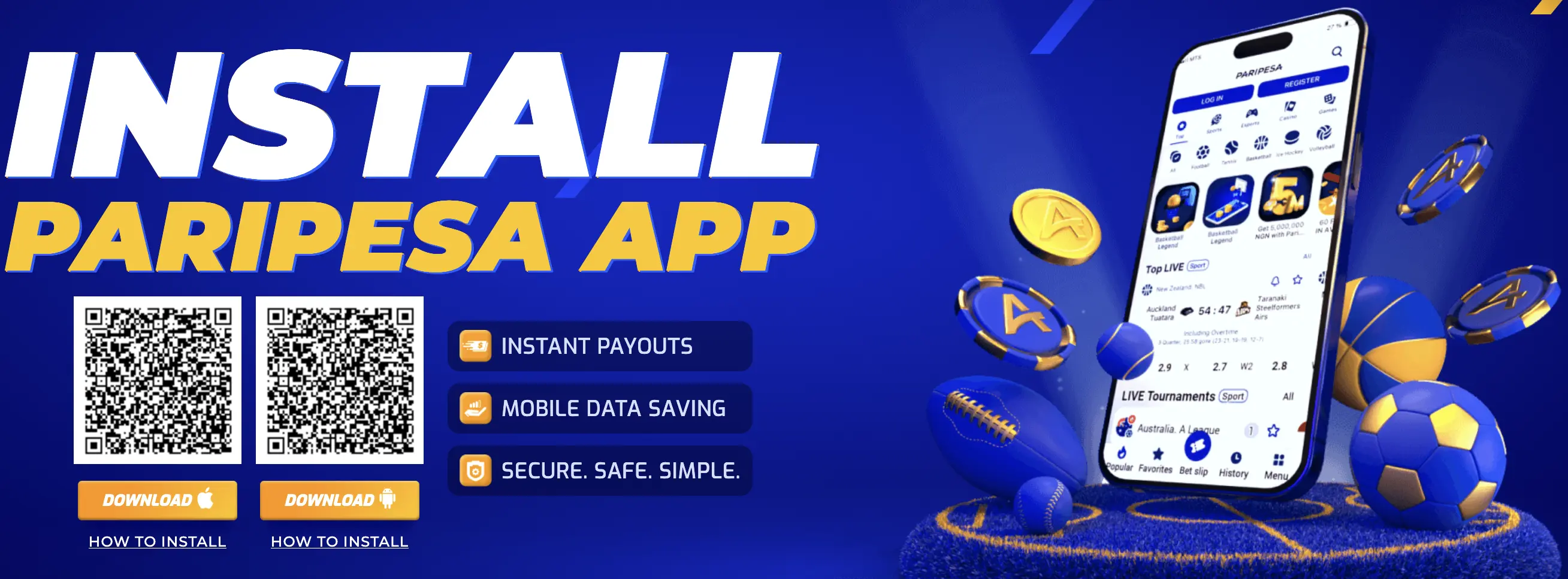
Choose How to Use PariPesa on Mobile
Install the Android application or use the current iPhone and iPad browser route. The responsive website remains available without a download.
Download the App
Open PariPesa’s verified mobile route to obtain the current APK. Android may request source-specific permission before installing an application outside Google Play.
Download for AndroidView the iOS Guide
Use the supported mobile website in Safari and optionally add it to the Home Screen. An Android APK cannot be installed on an Apple device.
Open the iOS GuideThe Android CTA uses the dedicated PariPesa app route. Availability, compatible operating-system versions and the current file can change; verify the destination before installing.
How to Download and Install the PariPesa APK on Android
Android menu labels differ by manufacturer and operating-system version. Grant installation permission only to the trusted browser or file manager used for this download—not as a permanent device-wide setting.
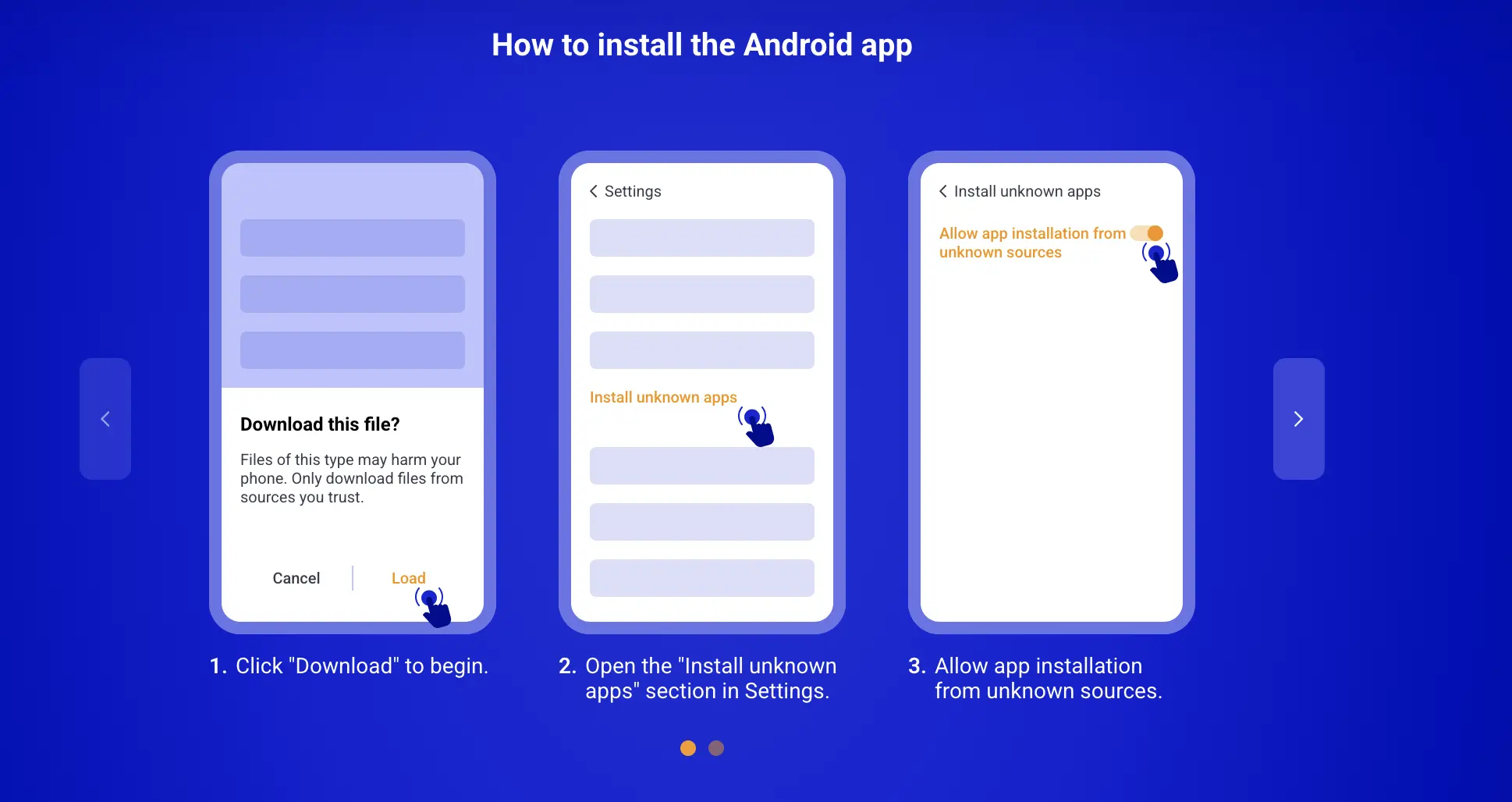
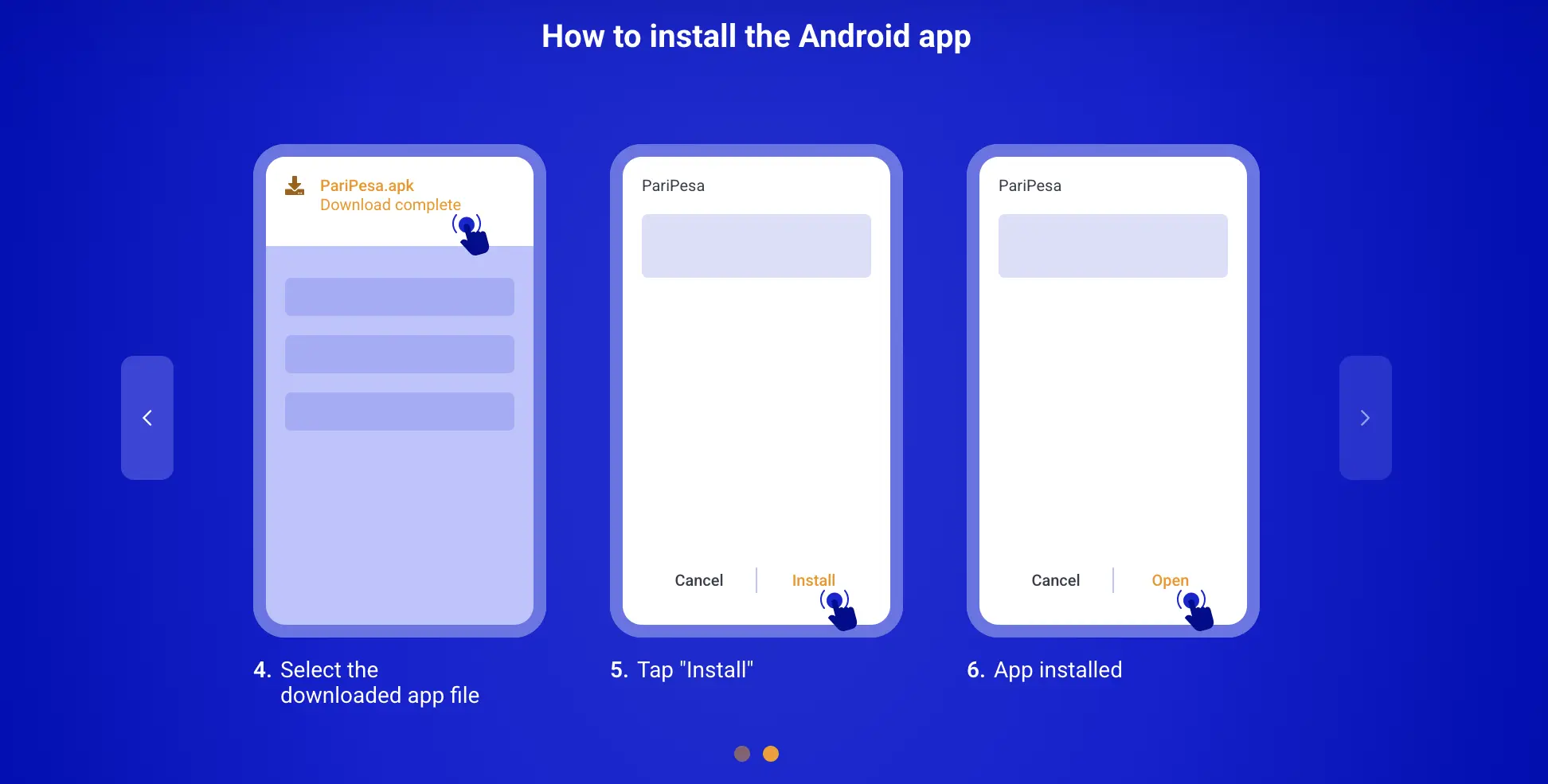
Android Installation Evidence
These reference captures come from the documented PariPesa installation flow. Button names and screen layouts can differ by Android version and phone manufacturer.
Open the Verified App Route
Use the app button in this guide and inspect the destination before downloading. Avoid APK links from messages, forums or unrelated file sites.
Choose the Android Download
Select the Android or APK option shown for the device and wait for the file to download completely.
Review the Downloaded File
Check that the file came from the route you opened, has the expected APK type and was not renamed or supplied by another application.
Allow Installation from That Source
If Android blocks the installation, permit installs for the specific trusted browser or file manager when prompted. Do not enable unknown-source access broadly.
Open the APK and Install
Use the completed download notification or Downloads folder, select the APK, review the requested permissions and tap Install.
Disable the Temporary Install Permission
Return to the device’s special app-access settings and disable the source permission if it is no longer needed.
Open the App and Use Your Account
Log in with the existing registered credentials or create one accurate account. Do not register again merely because the device changed.
How to Use PariPesa on iPhone and iPad
The dependable Apple-device route is the mobile website in Safari. It provides app-like access without changing the App Store country, creating another Apple account or installing an Android APK.
Open Safari
Use Safari on the iPhone or iPad and open the verified PariPesa mobile destination.
Log In or Register
Use the existing account credentials, or follow the registration guide if you do not yet have an account.
Use the Mobile Website Directly
Sportsbook, live, casino and account functions can be accessed through the responsive browser interface where available.
Add It to the Home Screen
For quicker access, tap Safari’s Share button, choose Add to Home Screen, review the name and confirm.
Launch the Shortcut
Open the new Home Screen icon when needed. It remains a shortcut to the live website, so platform updates load automatically.
This guide does not ask users to change their Apple ID region, invent an address or create a second Apple account. Use the supported mobile website unless PariPesa presents a verified native iOS route for the actual market.
PariPesa App vs the Mobile Website
Both routes use the same account. The better option depends on whether you prefer a dedicated Android installation or immediate browser access across devices.
| PariPesa App | PariPesa Mobile Website |
|---|---|
| PariPesa AppMust be downloaded and installed on a compatible Android device | Mobile WebsiteOpens directly in a supported browser |
| PariPesa AppInterface is designed around supported mobile devices | Mobile WebsiteResponsive layout adapts to the browser and screen size |
| PariPesa AppPerformance depends on the device, app version and connection | Mobile WebsitePages load through the active internet connection |
| PariPesa AppMay require a current APK or periodic application update | Mobile WebsiteWebsite changes appear without a separate app update |
| PariPesa AppMay offer notifications depending on the application and device settings | Mobile WebsiteBrowser notifications depend on browser and device permissions |
| PariPesa AppDirect access through the installed application | Mobile WebsiteAccount access through a mobile or desktop browser |
| PariPesa AppBest suited to frequent use on one supported Android device | Mobile WebsiteUseful across supported phones, tablets and computers |
The mobile website is the practical fallback if you do not want to install an app, if an APK is incompatible or while the installed version is being updated.
Download Safety, Permissions and Updates
An APK is an installation file, so its source and permissions deserve more attention than an ordinary web link. These checks reduce avoidable risks without pretending that any download is risk-free.
Start from the dedicated PariPesa app destination. Avoid APK mirrors, shortened links sent by strangers and files attached to messages.
Confirm the download completed and that the filename and source match the installation you intended before opening it.
Allow installation only for the trusted browser or file manager that opened the APK. Do not enable unknown-source access device-wide.
Once installation finishes, remove the temporary source permission unless it is still genuinely required.
Pause if the app asks for access that appears unrelated to account use. Do not approve permissions merely to clear a warning.
Notification availability depends on the app, browser and device settings. Betting alerts are not required for account access.
Use a screen lock, current system updates and a private device. Do not save credentials on a shared phone.
Never disclose passwords, payment PINs or one-time codes to someone offering to install or repair the app remotely.
Before Installing
Check available storage, Android compatibility, a stable connection and the completed file. Keep the mobile website available as a fallback.
Updating Safely
Return to the verified app route for the current APK. Never install an “urgent update” received through an unsolicited message. Mobile-web changes load automatically.
Common PariPesa App Problems and Fixes
Start with the least disruptive fix and keep the mobile website as a working alternative. Do not erase account data or create another account simply because an application fails.
| Problem | What to Check | Practical Next Step |
|---|---|---|
| APK download is incomplete | File size, connection and download status | Delete the partial file and download it again through the verified route. |
| Installation is blocked | Source-specific permission and device policy | Allow the trusted browser or file manager temporarily, then disable that permission after installation. |
| “App not installed” or parse error | Android version, device architecture, storage and file integrity | Remove the failed file, confirm compatibility and use mobile web if the APK remains unsuitable. |
| App will not open | Current version, available memory and device restart | Restart the phone, obtain the current APK from the verified route and use the browser while troubleshooting. |
| Update loop or outdated version | Whether the APK came from the current app page | Return to the verified app route instead of accepting an update file from a message or mirror site. |
| Login fails in the app | Same credentials, network and account status | Test the official mobile website, then use the password-recovery process if the credentials are rejected there too. |
| Slow loading or delayed live odds | Connection stability and data restrictions | Switch to a reliable connection, refresh the market and do not confirm a bet until the displayed price is clear. |
| iPhone installation confusion | Android APKs do not run on iOS | Use Safari and add the mobile website to the Home Screen instead of trying to install the APK. |
| Notifications do not appear | App, browser, device and permission settings | Treat notifications as optional; check the account directly for current markets and transactions. |
| Source or permissions look suspicious | Download origin and requested access | Stop, remove the file or app and use the verified browser route while contacting official support. |
Give support the device model, Android or iOS version, app version if visible, exact error and time observed. Redact passwords, one-time codes, payment PINs and complete identity documents from screenshots.
PariPesa App FAQ
Direct answers about Android installation, Apple-device access, permissions, accounts and updates.
Is the PariPesa app available for Android?
Yes. Android users can download the PariPesa APK through the verified app route and install it on a compatible phone or tablet.
Can I use PariPesa on iPhone or iPad?
Yes. The dependable route is the mobile website in Safari, which can also be added to the Home Screen for app-like access. Older material documents an App Store country-switching workaround, but xMaat does not recommend entering an inaccurate country, address or Apple ID information.
Do I need to install the PariPesa app?
No. The mobile website provides browser access to the main account, sportsbook and casino functions without an installation.
Is it safe to download the PariPesa APK?
Use only a verified PariPesa app route, avoid random APK websites and review the filename, source and requested permissions before installing.
Why does Android ask to allow installation from this source?
An APK installed outside the default app store may require source-specific installation permission. Enable it only for the trusted browser or file manager used, then disable it after installation.
Do the PariPesa app and website use the same account?
Yes. Use the existing registered account credentials; do not create a separate account merely because you changed device or access method.
How do I update the PariPesa Android app?
Use the verified app route to obtain the current APK and follow the update prompt. The mobile website updates automatically because it loads the live platform.
What should I do if the PariPesa app will not install?
Check device compatibility, storage, the completed APK download and source-specific install permission. If it still fails, use the mobile website while resolving the problem.