
Prepare the Details That Determine Your Account
A quick signup is useful only when the account is configured correctly. Your country, currency, identity details and contact method can affect payments, verification and the promotions shown after registration.
Select your true country of residence and the currency offered for that market. Changing either after registration may require support or may not be available. Never select another market merely to chase a different headline bonus.
How to Register for PariPesa Step by Step
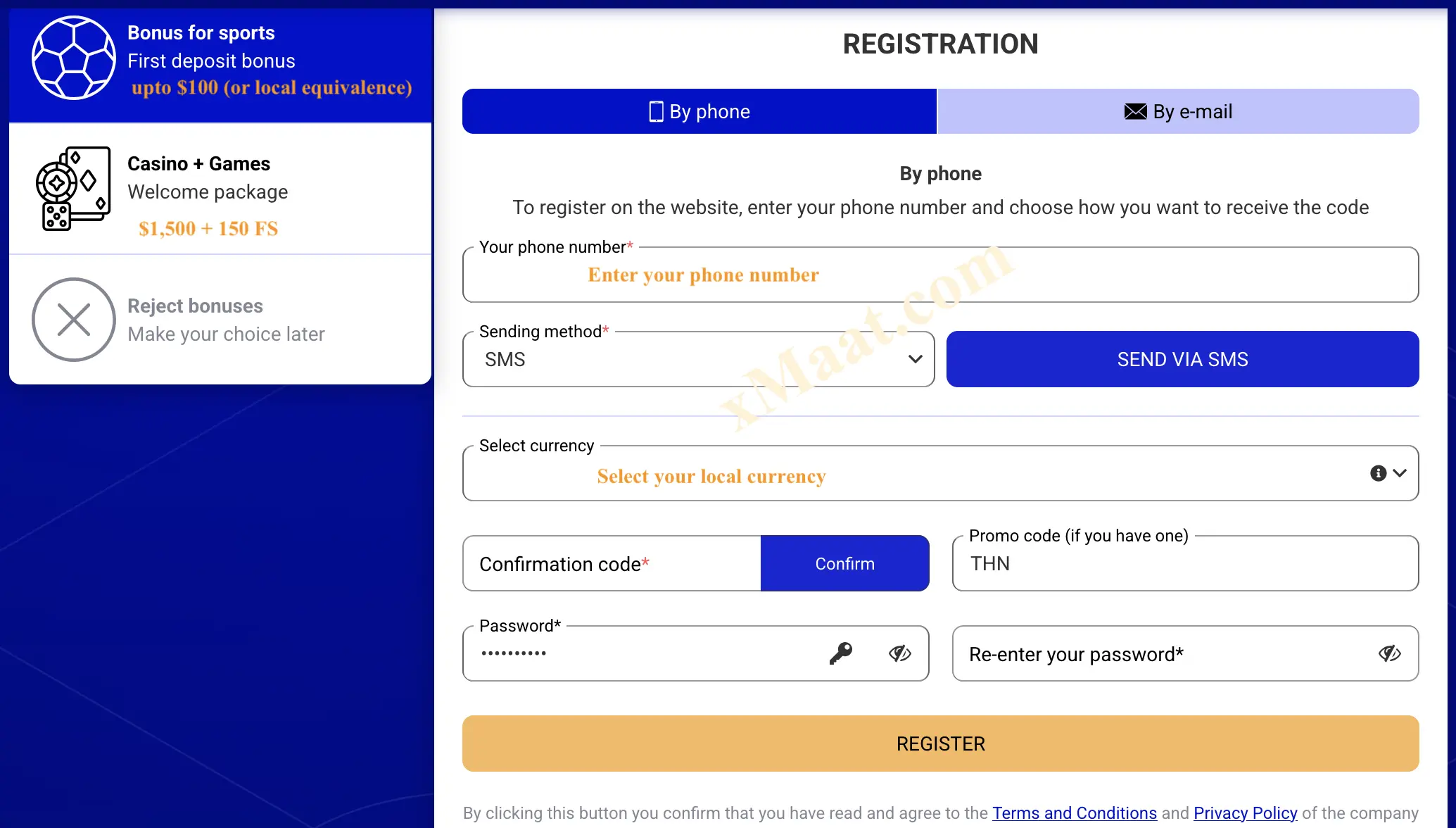
Button labels can vary by device or market, but the reviewed signup flow follows the sequence below. Read the whole sequence once before submitting the form.
Open the Registration Destination
Use the registration link in this guide, then choose Registration, Register or Sign up. Check the destination before entering personal information.
Choose Phone or Email Registration
Select the contact method currently displayed for your market. Use an address or number you can access immediately and retain for account recovery.
Enter the Contact Detail Correctly
For phone registration, confirm the country code and enter an active number. For email registration, check spelling carefully before requesting confirmation.
Request and Enter the Confirmation Code
Enter the one-time SMS or email code in the form. Do not share a confirmation code with anyone, including a person claiming to be support.
Add Your Real Personal Details
Complete the name, date of birth, country and other requested fields using information that matches your accepted identification document.
Select Your Actual Country and Currency
Confirm your market and its available local currency before proceeding. This selection can affect the cashier, displayed offers and later account checks.
Create a Unique Password
Use a long password that is not shared with email, mobile-money, banking or social accounts. Avoid names, dates, phone numbers and common password patterns.
Choose or Decline the Available Offer
Read the current sports or casino terms before opting in. If the form permits registration without a bonus, that choice may avoid wagering restrictions—but confirm what the form says.
Enter Promo Code THN
Add THN in the promo-code field before submission when the field appears. A code can connect the account to an offer but does not override eligibility or other terms.
Review, Accept and Submit
Check every field, read the account and promotion terms, confirm the age declaration, then create the account. After signup, open the profile and verify that the country, currency and selected offer are correct before depositing.
What the Registration Form Information is Used for
| Field | Why it matters | What to check |
|---|---|---|
| Phone or email | Confirmation, login and recovery | You control it and can receive the code now |
| Confirmation code | Proves access to the chosen contact method | Enter it only on the official form; never share it |
| Full name | Supports identity and payment checks | Match accepted ID and your payment account |
| Date of birth | Establishes age eligibility | Use the real date; underage gambling is prohibited |
| Country | Sets the market and available services | Select your real residence, not a preferred offer |
| Currency | Controls balances and cashier denominations | Confirm the appropriate local option before submission |
| Password | Protects account access | Use a long, unique value and store it securely |
| Promo code | May associate an eligible promotion | Enter THN before completing signup |
Sports or Casino: Choose the Offer You Intend to Use

For comparison, this guide uses standard reference amounts. The account will normally show the actual maximum in the currency available for your market. The displayed percentage, maximum, qualifying deposit, wagering, expiry, games and odds can change by jurisdiction.
- For eligible new sports accounts and qualifying deposits.
- Use the local-currency equivalent displayed in your account.
- Check accumulator, minimum-odds and wagering conditions before opting in.
- Do not deposit until the selected promotion is visible and understood.
- For eligible casino users and qualifying deposits.
- Free spins may be limited to specified games or release stages.
- Game contribution, maximum stake and wagering rules may apply.
- Use the local-currency equivalent shown for your market.
*Reference amounts are not a promise that the same promotion is available in every country. Confirm the live offer, currency conversion, qualifying deposit, wagering, expiry and exclusions before funding the account.
Complete Verification with Consistent Information
Registration can be fast, but full account use may require additional checks. Accurate information at signup reduces mismatches between the profile, identity document and payment method.
Checks PariPesa May Request
- Phone number or email confirmation
- Proof of identity and legal age
- Payment-method ownership
- Address or source-of-funds information where required
- Additional fraud or security review
Upload Documents Safely
Use the secure account area or a support route confirmed on the official platform. Do not send identification, passwords or one-time codes to unverified social accounts. Check what is requested, why it is required and how the document will be handled.
Third-party deposits can create ownership and withdrawal problems. Before the first deposit, review the cashier limits, fees, processing information and any verification requirement for the method you intend to use.
Common PariPesa Registration Problems
Recheck the contact detail and country code, signal or connectivity, spam folder and resend timer. Avoid repeated requests in quick succession.
Check for spaces and confirm you are still on the registration form. If the field or promotion is unavailable in your market, do not repeatedly create new accounts.
Stop before depositing. Check whether the profile permits a correction; otherwise use official support and explain the error clearly.
You may already have an account. Use login recovery instead of opening a duplicate profile, which may conflict with account or bonus rules.
Look for an incomplete required field, unchecked terms box, age declaration, password-format error or unsupported country selection.
Do not deposit on assumption. Check the promotions area, opt-in state and terms; then contact official support before funding if the expected offer is still absent.
PariPesa Registration FAQ
Short answers to the decisions that most often cause signup, verification or bonus problems.
What is the PariPesa registration promo code?
The code used in this guide is THN. Enter it in the promo-code field before submitting the signup form when that field is available.
Can I register for PariPesa with a phone number?
Phone registration is supported in the reviewed process. Use a number you control because an SMS confirmation code and future recovery messages may be sent to it.
Can I register through a mobile browser?
Yes. The registration form can be completed through a supported mobile browser without installing an app. The same accuracy and security checks apply.
Which country and currency should I select?
Select your actual country of residence and the local currency displayed for that market. Do not choose a different market merely to obtain a different offer.
Can I register more than one PariPesa account?
Do not create a second account to solve a login, verification or bonus problem. Use account recovery or official support because duplicate-account rules may apply.
Why did my SMS code not arrive?
Check the number and country code, mobile signal and SMS storage, then wait for the resend timer. Avoid repeatedly requesting codes and contact official support if the issue continues.
Does registering guarantee a bonus?
No. Registration alone does not guarantee a bonus. Eligibility, opt-in, qualifying deposit, wagering, market availability and other current terms apply.
Will PariPesa ask for identity verification?
Identity, age, phone or payment-method checks may be required, particularly before withdrawals or when a security review is triggered.